

What FxPro is and what to understand before registering
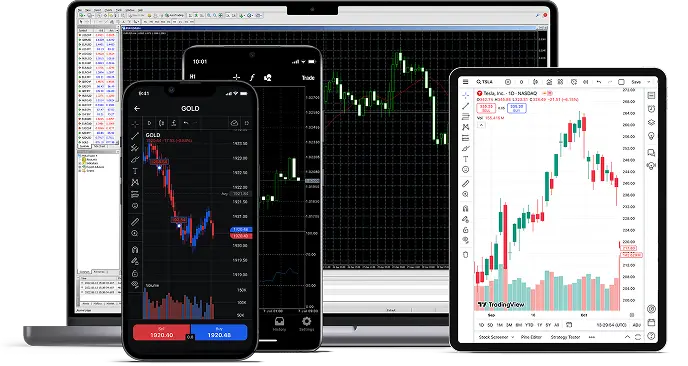
FxPro is an international online trading brand that offers several trading platforms and account types. The main page of fxpro.com lists the MetaTrader 4, MetaTrader 5, cTrader, FxPro WebTrader, FxPro App, and TradingView families. A client does not work with an abstract "FxPro" but with a specific legal entity named in the agreement, and that entity determines the available instruments, leverage, payment methods, and level of protection.
Three practical takeaways before opening an account: first, check which legal entity serves your country and under which license it operates. Second, compare not only the spread but also the commission per side, swap, and conversion of the account currency. Third, try trading on a demo account and only then deposit funds. Important: service availability depends on residence, and the main page may show the group's corporate page instead of the trading page. this does not mean the product has automatically stopped operating worldwide.
Who this guide is for
The material is intended for those choosing between FxPro platforms, studying the terms of Standard, Raw+, Elite, and cTrader accounts, or wanting to understand the registration, verification, deposit, and withdrawal process. This guide is informational: it does not open accounts, accept deposits, or collect documents.
FxPro platforms: how to choose between MT4, MT5, cTrader, and WebTrader
According to the comparison page at fxpro.com/trading-platforms/comparison, several platforms are available to clients, and the choice depends on experience, tools, and preferences for position accounting.
| Platform | Who it suits | Key feature |
|---|---|---|
| MetaTrader 4 | Traders with MT4 experience, users of expert advisors | Hedging, classic ecosystem |
| MetaTrader 5 | Those who need a broader timeframe and accounting modes | Netting or hedging at your choice |
| cTrader | Users of the depth of market | Commission of 35 USD per 1 million USD turnover per side on FX and metals |
| WebTrader | Those who trade from a browser without installation | Web access to the account |
| FxPro App | Mobile trading | Two-factor authentication, biometrics |
| TradingView | Users of TradingView charts | Connects to the family of cTrader accounts |
What to check when choosing
For active trading, not only charts matter, but also commissions, execution, and the convenience of position accounting. MT4 uses hedging, while MT5 allows you to choose netting or hedging. this affects the number of open positions on a single instrument. The minimum lot size starts from 0.01 on applicable instruments, but the specification must be checked separately for each asset. For more on the differences, see the MT4 and MT5 pages, and for cTID and settings, see the cTrader section. The FxPro App is available for iOS, Android, Huawei, and tablets, but availability in stores should be checked via the official links; it claims two-factor authentication and login by fingerprint/code.
FxPro account types: Standard, Raw+, Elite, and cTrader
The account comparison page at fxpro.com/trading-platforms/comparison names four families: Standard, Raw+, Elite, and cTrader. They differ in commission model and spread approach, so you should choose based on trading style, not promised returns.
- Standard. a spread account; separate commissions should be checked in the specification of the selected instrument.
- Raw+. spread from zero plus 3.50 USD per lot per side on major currency pairs. This is a starting quote, not a guaranteed cost of execution.
- Elite. an account for clients with other servicing conditions; specific parameters should be verified against the published conditions and current documentation.
- cTrader. commission of 35 USD per 1 million USD turnover per side on FX and metals; opening and closing a trade are both included in the calculation.
A starting spread is not the same as the actual cost of a trade: execution may differ during moments of volatility. Before choosing an account, look at swaps, conversion fees, and account currency. A breakdown of all types is on the account types page.
Demo account: how to practice and what to check before real money
A demo account allows you to practice using the platform without risk: logging in, placing orders, stop orders, position size, and margin calculation. This is especially useful before the first deposit, because demo and live account conditions may differ, but the terminal logic remains the same.
Practical checklist
- Make sure the chosen account type and platform match each other (for example, a cTrader account requires cTID).
- Check how margin is calculated at the chosen leverage and what drawdown is acceptable.
- See how swaps and commission are displayed in the account history.
- Practice the full path: opening, modifying, closing a position.
- Only after that move on to the deposit question.
A demo account does not prove profitability and does not guarantee similar execution on the live market. More. in the demo account section.
Registration and login: different credentials for different systems
Registration begins with checking the country of residence and the legal entity that will service the account. According to fxpro.com legal information, services and products depend on the client's place of residence, and restrictions include the USA, Iran, and Canada. The list may change, so rely on the current page and the documents offered to you during registration.
It is important not to confuse credentials: access to the FxPro Direct personal cabinet (account management, payments, documents) is one thing, while the login and password for the trading terminal (MT4, MT5, cTrader) are another. Login to cTrader is via cTID, and its credentials do not match those of the cabinet. Input errors are often related to this.
Step-by-step
- Open the official website and make sure you see the trading page, not the corporate one: display depends on region.
- Check which legal entity and license are indicated for your country.
- Fill in the registration form with accurate data. they must match your documents.
- Keep access to your email: confirmations and login details will be sent there.
- Complete verification before the first withdrawal.
This guide does not accept registration data, passwords, or documents. More. on the registration and login pages.
Verification: documents, upload, and verification status
Verification is needed to confirm identity and address. Usually this is an identity document and proof of address; the exact list depends on the legal entity and regulator requirements. Verification takes time, and some operations may be restricted until it is completed.
Documents are uploaded only in the secure FxPro Direct cabinet: usually via the My Profile or Upload documents section; in the mobile app. via the corresponding settings. Do not send documents to third parties and do not upload them to third-party resources.
What affects speed
- Quality of scans: readability, no glare, all corners of the document.
- Data consistency: name and address must match what is specified in the cabinet.
- Document validity: expired documents are not accepted.
- Proof of address may be requested not older than 6 months (for example, a utility bill or bank statement).
If the status does not change for a long time, describe the situation to support: indicate the upload date, document type, and ticket number. More. in the verification section.
Deposits and withdrawals: currency, methods, and procedure
Deposits are made through the personal cabinet. FxPro offers various methods, and availability depends on the country, legal entity, and account currency. Before the first payment, check: deposit and withdrawal fees, minimum amount, processing time, and account currency. Currency conversion can add costs if the payment currency differs from the account currency.
Withdrawing funds
- Make sure verification is complete and the payment method details match the account owner's details.
- Submit a request in the cabinet and check whether re-verification of the method is required.
- Track the request status: processing may take business hours, not instant.
- Consider returns: part of the amount may be returned via the same method used for the deposit.
If a request is rejected, the reason is usually a name mismatch, insufficient verification, or a method limit. More. on the deposit and withdrawal pages.
Fees: spread, commission per side, swap, and conversion
The cost of a trade consists of several parts, and looking only at the spread is not enough. According to the comparison page fxpro.com/trading-platforms/comparison, Raw+ on major currency pairs starts from a spread from zero plus 3.50 USD per lot per side, and cTrader. 35 USD per 1 million USD turnover per side on FX and metals, where both opening and closing are counted. These figures are published terms, not a fixed final cost of a specific trade.
| Component | What it means | Where to look |
|---|---|---|
| Spread | Difference between buy and sell price | Instrument specification |
| Commission per side | Separate fee for entering or exiting a trade | Account page and transaction history |
| Swap | Fee or credit for holding a position overnight | Swap table |
| Conversion | Exchange between account and payment currencies | Cabinet terms |
Zero swaps appear in promotional materials, but they must be checked against the swap table for the specific instrument: terms may differ and change. More. in the fees section.
Regulation: legal entities, licenses, and the situation in Russia
FxPro is a brand, not a single legal entity. The licenses page lists, among others, FxPro UK Limited (FCA, registration 509956), FxPro Global Markets Limited (Bahamas SCB, license SIA-F184), and Invemonde Trading Ltd in partnership with FxPro Global Markets Ltd (Seychelles FSA, SD120). The UK company is an FSCS member, but this protection does not automatically extend to other legal entities: the right to compensation depends on the client's status and the nature of the claim.
FxPro states that client funds are segregated, and negative balance protection applies under contractual terms. Neither segregation nor negative protection means that a trading loss is insured.
Russia
The Bank of Russia's warning list includes an entry "Fx Pro, FXRed" with the category "signs of an illegal professional securities market participant," including the domains fxpro.com and fxpro.ru; the date of inclusion is 24.01.2024, the last displayed update is 22.10.2026. This is a regulatory entry, not a court decision: it indicates signs of illegal activity in Russia, but does not prove the absence of a license for all brand companies abroad. A foreign license is not a Russian license. The possibility of registration from Russia has not been verified in this guide; before registering, check which legal entity serves your country and verify its license against the document offered to you. More. in the regulation section.
Support, risks, and useful next steps
FxPro support is stated to operate 24 hours a day, five days a week. this is not a round-the-clock mode without days off. When seeking help, describe the problem specifically: account type, platform, time of operation, ticket number, and attach a screenshot without personal data if appropriate. First check the FAQ section: many issues are related to different credentials for the cabinet and terminal.
CFDs are complex instruments with the risk of losing funds due to leverage and volatility. The materials in this guide are not investment advice.
- Platforms. comparison of MT4, MT5, cTrader, WebTrader, and the app.
- Accounts. differences between Standard, Raw+, Elite, and cTrader.
- Regulation. licenses and legal entities.
- CFD risks. information limitations and risks.